
“Where is my phone?” — answered without the phone call
The QR on the ticket you already hand over opens a page showing where that repair has got to. No app, no account, no password, and nothing on it that you would not say at the counter.
The call every shop takes ten times a day
Each one is thirty seconds. Thirty seconds, ten times, on a Saturday, is the whole problem.
Someone rings to ask whether it is ready, and the answer is “not yet”.
The person who answers has to find the ticket before they can say anything.
A customer turns up to collect a device that is still waiting for a part.
The same customer rings three times because nothing told them anything changed.
A repair took longer than quoted and the first they hear of it is at the counter.
You ask for a review a week later, by which point the job is a blur to them.
From the counter to a page they can check
Nothing here is a separate thing to set up. It is on the paperwork you already print.
- 01Book it inThe ticket gets a link of its own, and a QR that encodes it.
- 02PrintThe QR is on the ticket, the label and the receipt as they come off the printer.
- 03They scanThe phone camera opens the page. No account, no download, no login.
- 04They see progressThe status, what it is, who has it, and when it is due back.
- 05ReadyThe page shows completed, so the trip to the shop is a trip worth making.
- 06ReviewOnce the job is finished they can rate it, from the same link.
The customer never creates anything. The link is the ticket, and the ticket already existed.
The QR is already on the paperwork
Printed from the same template as everything else, so the link and the document cannot disagree.
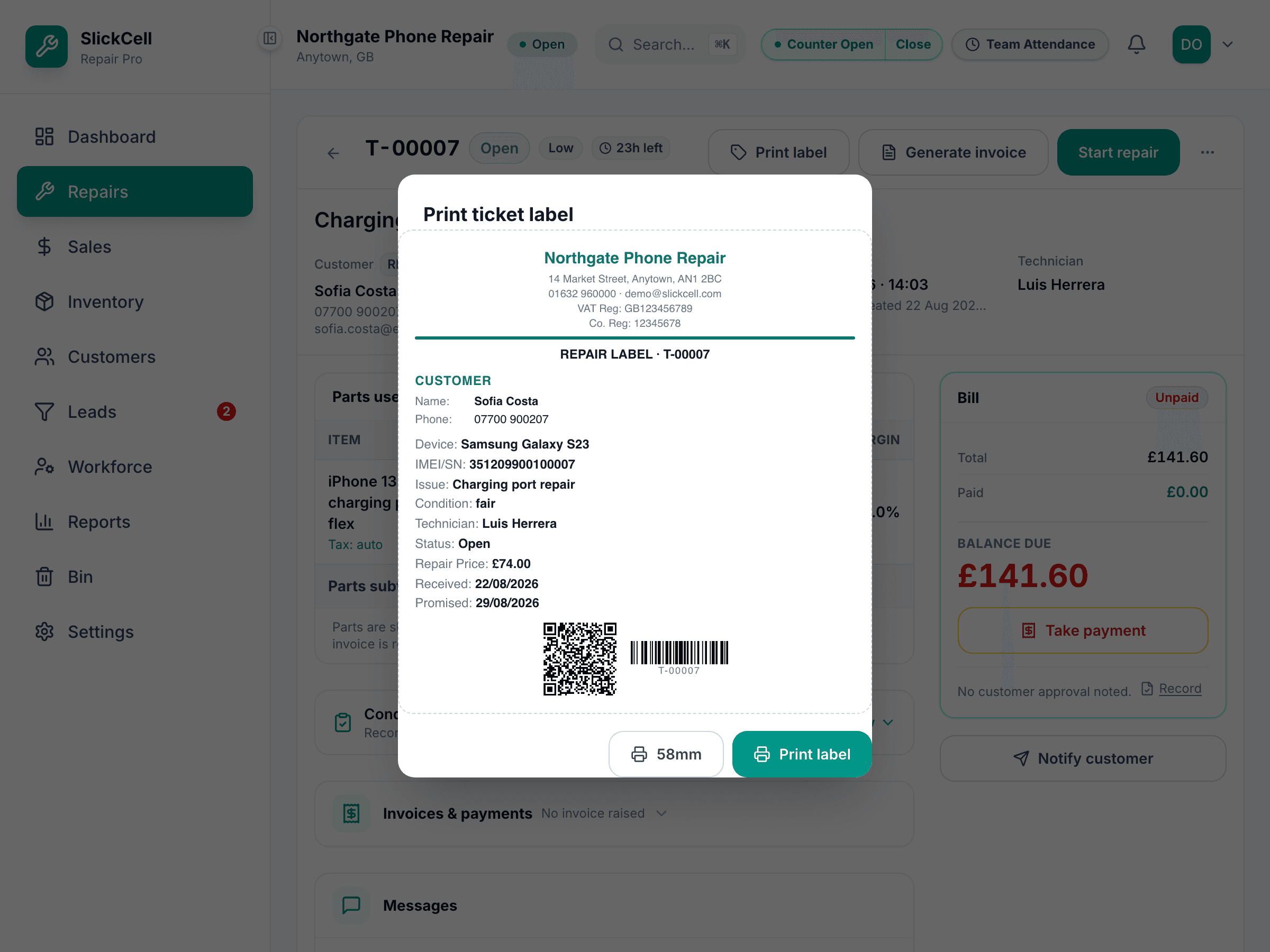
Ticket, label, receipt or A4 — one template
The QR is generated as the document is drawn, so whichever format you print, it carries the link for that job. Change the paper size and it is the same document, not a different one.
One template renders A4, 80mm, 58mm and label — and the PDF comes from it too.
What you get back
- Fewer interruptions
- The commonest question a repair shop is asked has an answer that does not need a person.
- Collections that are not wasted trips
- Someone who can see “not ready yet” does not come in to be told it.
- Nothing to sign up for
- No customer account, no portal password to reset, no app to persuade anyone to install.
- Reviews while it is fresh
- Asked at the moment the job finishes, from the link they already have open.
- Credit where it is due
- A review attaches to the technician who did the work, not to the shop in general.
What is on the page, and what is not
A link anyone can open is a decision about disclosure, so this is the part worth reading.
- The repair page shows progress, not money
- Status, the stage it has reached, the device, who is working on it and when it is due. No prices, no line items, and the customer's first name only.
- The invoice page shows the bill
- A separate link, rendered from the same template as the printed receipt: the lines, the total, what has been paid and what is still due, with a PDF to download.
- Search engines are told to stay away
- Both pages carry noindex, nofollow and noarchive, and the site's robots file disallows them. They are unlisted pages, not published ones.
- A link can be turned off
- Links can be given an expiry date or revoked outright, and a revoked link stops working immediately. Rotating or revoking one is an owner or manager action.
- Following one link does not unlock the other
- The repair page links to its invoice and the invoice links back — but each is checked on its own. Revoke the invoice link and the repair page stops offering it.
- A review waits for the job to finish
- The option appears once the repair is completed or handed over, whichever link the customer arrived through, and only once per repair.
- Reviews are yours, not ours
- They are visible inside your shop and nowhere else. Nothing publishes them to this site, to a directory, or to any public profile.
What customer tracking carries
A QR on the paperwork
On the ticket, the label and the receipt, generated as the document is drawn.
A status page with no login
Stage, device, technician and due date, in the order things happened.
The invoice, and a PDF
Lines, total, paid and balance due — the same document you would hand over.
Linked both ways
The repair page opens its invoice, and the invoice opens the repair — each checked separately.
Unlisted, expirable, revocable
Noindexed and disallowed in robots, with links that can be given an end date or switched off.
A rating out of five
Offered once the job is finished, with an optional comment and name.
Attributed to the technician
Each review is tied to whoever the job was assigned to, and shows on their record.
Whatever printer you have
A4, 80mm, 58mm or a label — the QR is on all of them because they are one template.
The questions owners ask about showing customers anything
Some will not, and the calls from those people carry on exactly as now. The ones who do use it are the ones who would otherwise have rung twice — and scanning a code on a receipt with a phone camera is roughly as much effort as reading the receipt.
Yes, and that is why the page is built the way it is. The repair page carries no prices, no line items and only a first name. The links are unlisted, not published: search engines are told not to index them, and you can give a link an expiry or revoke it.
No. There is nothing to sign up for, no password and no app. The link is the whole thing.
Not from a template — the built-in message templates do not carry the tracking URL. You can paste a link into a custom message, and the printed paperwork carries it as a QR.
Once the repair is completed or handed over, and once per repair. Before that the option is not shown, so nobody is invited to rate a job that has not been done.
No. They are visible to your shop, summarised on the customer record and on the technician who did the work. Nothing publishes them anywhere else.
Scan a ticket and see what your customer sees
We will book a job in on a demo shop, print the ticket, and you can scan it with your own phone.