
Let the shop use the system without handing over the shop
A Saturday assistant needs to book a repair in. They do not need to see what the parts cost, void an invoice or read the payroll. Permissions here are enforced by the database, not by hiding buttons.
Where staff access goes wrong
Usually not through malice. Through everyone having one login because splitting it was too much trouble.
Everyone signs in as the owner, so the audit trail says the owner did everything.
A technician can see the cost price of every part on the shelf.
Anyone can void an invoice, and nobody can say who did.
Hours are on a paper rota and re-typed into a spreadsheet at month end.
A pay rate changed mid-month and the whole month got paid at the new one.
Who is actually busy is a question you answer by walking to the bench.
From a new starter to a paid month
The same record carries the person, what they may do, what they worked and what that cost.
- 01Add the personAn employee record, with their documents kept against it.
- 02Give them a roleOne of five, deciding what they can see and do.
- 03Set the ratePay rates are effective-dated, so a rise starts when it starts.
- 04Work the queueJobs are assigned, and load is measured from real assigned work.
- 05Record attendanceHours and leave against the employee, with adjustments audited.
- 06Run payrollAttendance is priced at the rate in force on each day.
- 07PayslipA document produced from the run, and a cost the reports can see.
Because the rate is effective-dated, a mid-month rise is applied from the day it took effect rather than being smeared across the whole month.
Permissions that are actually enforced
The part most systems get wrong.
Owner, manager, technician, sales, accountant
Each role gets its own view of each area — none, read, or full — and on top of that, whole groups of fields can be hidden. That is how a technician works a ticket without ever seeing what the part cost. The rules live in the database, so they hold whether the request comes from the app or not.
Permissions are enforced by database policy, not by hiding a button.
Device Units (IMEI / Serial)
3 unitsTotal Stock Value (available × cost)
- 1 353915107721480Sold
128GB · Midnight · Grade A · 91% · Unlocked
Cost £235.00 · Sell £319.00INV-00051T. Novak - 2 353915107693122Available
128GB · Starlight · Grade A · 88% · Unlocked
Cost £228.00 · Sell £309.00 - 3 353915107705518Available
128GB · Blue · Grade B · 84% · Unlocked
Cost £212.00 · Sell £289.00
- POS Sale23 Jul 2026−1iPhone 13 128GBDEV-IP13-128IMEI: …721480
3 → 2 units · available → sold · INV-00051
- POS Sale23 Jul 2026−2Tempered Glass Screen ProtectorACC-TGP-13
40 → 38 units · INV-00048
- Purchase Received12 Jun 2026+1iPhone 13 128GBDEV-IP13-128IMEI: …721480
2 → 3 units · → available · GRN-0018
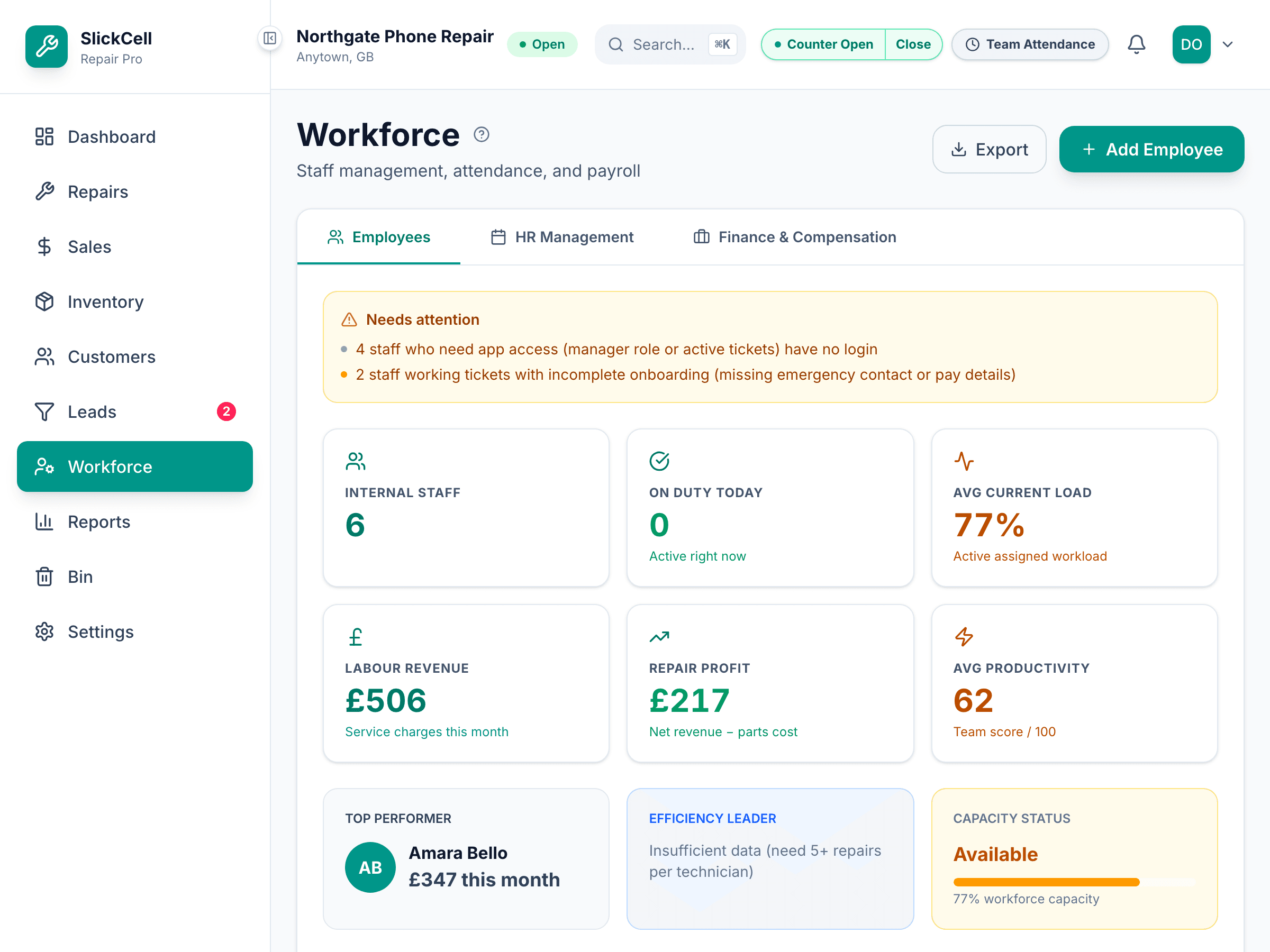
Who is busy, measured from actual jobs
Technician load comes from the minutes of work actually assigned and still open, against the capacity of a day. It is a figure derived from the queue, so it moves when the queue moves.
Load is computed from assigned work, not entered by hand.
Everyone gets their own login, and it is safe to give them one
- The audit trail names a person
- Because everyone signs in as themselves, 'who did this' has an answer.
- Costs stay behind a role
- Field-level visibility keeps cost and margin away from the roles that do not need them.
- Hours become a payroll input
- Attendance is priced against the rate that applied on the day, not the rate today.
- Workload is visible
- Who is loaded and who is free comes off the job queue rather than off a guess.
Every SlickCell feature is included on every plan — plans differ by team size, locations, discounts and support.
The ones that decide whether staff access works
- A technician needs to order a part but not see its cost
- Role permissions are per-area, and field groups are separate again — so the action and the figure are two different decisions.
- Someone's pay rate changes mid-month
- Rates are effective-dated. The days before the change are priced at the old rate and the days after at the new one.
- A leave balance was wrong and needs correcting
- The correction is an adjustment with a record behind it, not an edit to a number that leaves no trace.
- The accountant needs the figures but should not issue refunds
- That is exactly what the accountant role is: financial reporting without the operational actions.
- Someone leaves
- Their access is removed while their history stays intact — the work they did does not detach from the record.
- A manager covers a shift at another branch
- Membership is per-shop, so access follows where they actually work.
Statutory deductions are not calculated here — see the questions below.
What workforce carries
Employee records
The person, their details and their documents in one place.
Five roles, server-enforced
Owner, manager, technician, sales and accountant — enforced by database policy.
Attendance and leave
Hours and absence against the employee, with corrections recorded as adjustments.
Effective-dated pay rates
A rise applies from the day it takes effect, not across the whole month.
Payroll runs and payslips
Attendance priced into a run, producing a payslip and a cost the reports can see.
Output and load
What each technician completed, and how loaded they are right now.
What owners ask about staff and pay
No, and this is the important one to be straight about. It records hours, prices them against effective-dated rates, produces a payslip and gives your reports a real labour cost. It does not calculate statutory deductions and it does not file anything with anyone. It produces the inputs your payroll process needs — it is not that process.
Real. The rules are mirrored into database policy, so a role that cannot do something cannot do it regardless of how the request arrives. Hiding the button is the presentation of the rule, not the rule.
Yes. Beyond area-level permissions there is field-group visibility, and cost and margin are one of those groups. A technician can consume a part on a job without the cost being on their screen.
Four people is exactly where it starts to matter, because it is the size where everyone shares one login and the audit trail becomes useless. The value is not restriction, it is being able to answer who did something.
No. It records shifts, attendance and leave. It does not build a rota for you or work out holiday entitlement.
From the work actually assigned and still open, measured in minutes against a day's capacity. It is derived from the job queue, so it reflects what is really on the bench.
Bring your staff list and how you want it split
We will set up the roles, show you what each person can and cannot reach, and run a month of hours through payroll.