
Your staff already carry a barcode scanner
Show a code on the till, scan it with any phone in the shop, and that phone starts scanning stock into the open sale. Nothing to install, nothing to log in to, and nothing to buy.
Why the scanner never gets bought
It is never urgent enough to buy and never cheap enough to buy four of.
One scanner, two tills, and it lives at whichever one used it last.
The second counter types SKUs by hand because the hardware never got ordered.
A Saturday assistant is handed the till and cannot be handed the cost prices with it.
Stock arrives in a box on the floor, nowhere near the desk the scanner is cabled to.
The wireless one is flat, and the charger is in the back.
Someone mistypes a SKU and the sale goes through against the wrong item.
Paired in about ten seconds
The whole setup is a code on one screen and a camera on another.
- 01Open the saleStart a sale at the till as you normally would.
- 02Show the codeThe till displays a pairing QR, good for ten minutes.
- 03Scan itAny phone camera. The page opens; no app store, no sign-in.
- 04ConfirmThe phone asks whether to connect to that till, and names it.
- 05Scan stockEach barcode goes to the till, which resolves it and adds the line.
- 06Take paymentPayment happens at the till. The phone cannot take money.
- 07DoneCompleting the sale ends the session, and the code is spent.
The phone submits what it read. Everything else — resolving the code, the cart, the arithmetic — stays on the till.
The till keeps the cart
The phone is an input device with a screen, not a second till.
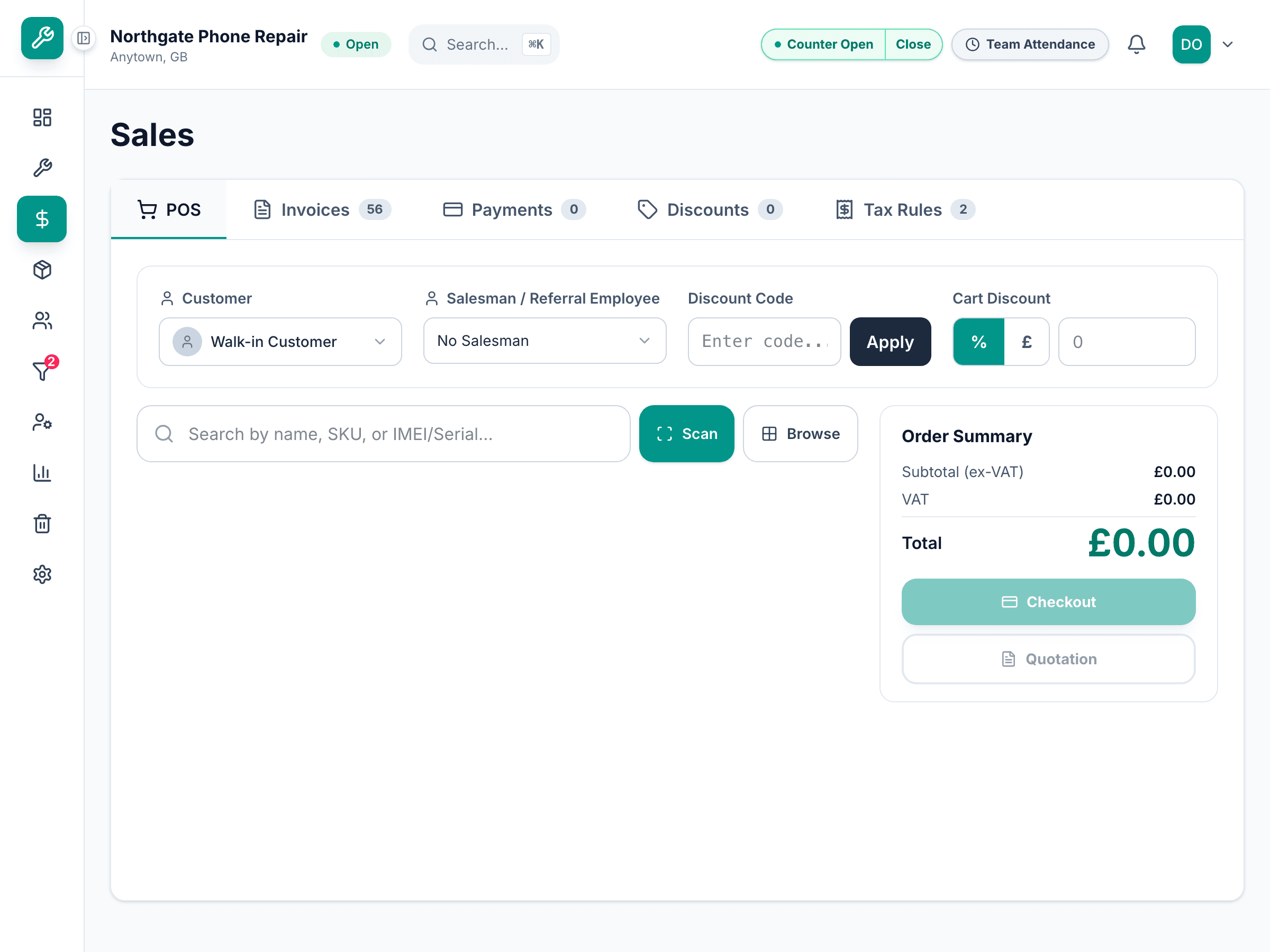
Scanned lines land in the sale on the counter
A scan is submitted as the raw code and resolved on the till, so the line that appears is the one the till's own catalogue matched — not something the phone decided. Quantities and removals work from the phone too; price changes and payment do not.
The phone submits scans. The till owns the cart and every figure on it.
What you stop needing
- Hardware you did not buy
- Every counter can scan, including the one you set up for the Christmas rush.
- Nothing to install
- No app, no store, no device management, and no phone that needs enrolling.
- A phone you can hand to anyone
- It carries prices, because a till does. It does not carry cost, margin, customer details or full IMEIs, and it cannot change a price or take a payment.
- Scanning where the stock is
- The box on the floor, the shelf at the back — not wherever the cable reaches.
- Fewer typed SKUs
- The commonest way a sale goes against the wrong item is somebody typing it.
What the phone can and cannot do
Handing a member of staff a phone that is connected to the till is a permission decision, so here is exactly what it grants.
- It can scan, adjust quantity and remove a line
- The three things a second pair of hands actually needs while a sale is being built.
- It cannot change a price or take a payment
- Discounting, overriding a price and tendering all stay at the till, under whatever role the person on the till has.
- It sees prices, not cost
- Line prices and the cart total are on the phone, because it is showing a sale. Cost, margin, supplier and the customer's name and number are not sent to it at all.
- It never sees a full IMEI
- A serialised unit shows as a six-character tail, enough to tell two handsets apart and not enough to write down.
- The code goes stale on its own
- Ten minutes to pair, thirty minutes maximum for the session however busy it is, and three minutes of silence ends it. Reopening the panel voids the old code and issues a new one.
- One phone per till
- A pairing code can be claimed once. A second phone scanning the same code is refused rather than joining.
- You can disconnect it from the till
- Disconnect ends the session immediately, and so does finishing the sale. The phone can also disconnect itself.
- Only some roles can pair one
- Pairing is limited by role, and the whole feature can be switched off for the shop.
- A dropped connection does not lose scans
- Events are numbered and acknowledged, so reconnecting catches up on what was missed exactly once rather than replaying or skipping it.
- If the till goes away, the phone stops
- A phone that loses the till stops its camera and says so, instead of quietly queueing scans nothing will read.
What the phone scanner carries
Pair with a code on screen
The till shows it, the phone camera reads it, and the phone confirms which till it is joining.
No app and no login
An ordinary web page. The link leaves the address bar once paired, and dies with the tab.
Straight into the open sale
Scan, adjust a quantity, remove a line. The till resolves every code against its own catalogue.
Camera, typing, or a photo
If the camera will not read a damaged label, type it or photograph it — both go the same way.
Codes that expire
Ten minutes to pair, thirty minutes at most, three minutes of silence to end it.
Role-gated and revocable
Only some roles can pair a phone, the till can disconnect it, and the shop can switch it off entirely.
Survives a bad connection
Numbered, acknowledged events, so a reconnect catches up exactly once.
Or use the scanner you own
Any USB or Bluetooth scanner that types like a keyboard works at the desktop, alongside this.
The questions owners ask before handing over a phone
Then buy one — any USB or Bluetooth scanner that behaves like a keyboard works at the desktop, and nothing here replaces it. This is for the second counter, the stock delivery on the floor, and the week you need three tills instead of one.
The sale in front of them: the lines, their prices and the total. Not cost, not margin, not the supplier, not the customer's name or number, and never a full IMEI — a serialised unit shows as a six-character tail.
No. The phone scans and adjusts quantities. Pricing, discounting and payment stay at the till under the role of whoever is on it.
The session ends by itself — three minutes of silence, and thirty minutes maximum however active it is. You can also disconnect it from the till, and completing the sale ends it.
It uses the browser's own barcode support where the phone has it and falls back to a decoder it loads on that page otherwise, which covers most iPhones. If the camera struggles with a damaged label, there is manual entry and a photo upload.
Not yet. Pairing a phone is on the till only. Stocktakes and goods-in have their own scanning at the desktop.
Pair your own phone to a demo till
Bring the phone in your pocket. We will show a code on screen and you can scan a shelf with it.